
HP ProLiant BL40p Server Blade Maintenance and Service Guide

Removal and Replacement Procedures
Processor Fan Assembly
To remove the processor fan assembly:
1. Power down the server blade and remove it from the server blade enclosure. Refer to the
“Server Blade Preparation” section in this chapter.
2. Remove the access panel. Refer to the “Access Panel” section in this chapter.
3. Remove the system board tray assembly. Refer to the “Removing the System Board Tray
Assembly” section in this chapter.
4. Disconnect the fan cable from the system board. Refer to Figure 4-3 to identify the fan
cable connector.
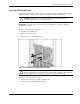
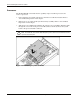
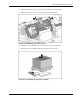
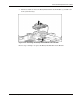
5. Press the release levers on the front of the fan assembly (1), and slide the tray to the open
position (2).
Figure 2-26: Disconnecting the processor fan assembly
2-26 HP ProLiant BL40p Server Blade Maintenance and Service Guide