
HP ProLiant BL40p Server Blade Maintenance and Service Guide

Removal and Replacement Procedures
Power Modules
The ProLiant BL40p server blade has two system board power modules and one PCI-X
mezzanine power module. Refer to Figure 4-3 and Table 4-2 for locations. To remove a
power module:
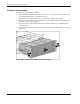
1. Power down the server blade and remove it from the server blade enclosure. Refer to the
“Server Blade Preparation” section in this chapter.
2. Remove the access panel. Refer to the “Access Panel” section in this chapter.
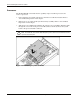
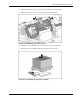
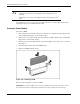
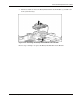
3. Pull out the power module latches (1), and remove the power module from the slot (2).
Figure 2-18: Removing a power module
HP ProLiant BL40p Server Blade Maintenance and Service Guide 2-19