
HP ProLiant BL40p Server Blade Maintenance and Service Guide

Removal and Replacement Procedures
Host-Bus Adapter Cards
The ProLiant BL40p server blade PCI-X expansion slots support only fibre channel host-bus
adapter cards. To install a host-bus adapter card into a PCI-X slot:
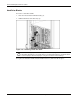
1. Power down the server blade and remove it from the server blade enclosure. Refer to
“Server Blade Preparation” in this chapter.
2. Remove the access panel. Refer to “Access Panel” in this chapter.
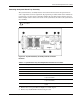
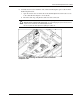
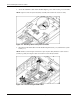
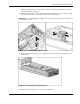
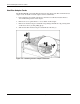
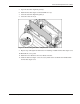
3. Remove the host-bus adapter card blank corresponding to PCI-X slot 1 by pressing down
on the release lever (1), then pulling up (2).
4. Slide the slate blue host-bus adapter card blank out of the slot (3).
Figure 2-13: Removing host-bus adapter card blanks
2-14 HP ProLiant BL40p Server Blade Maintenance and Service Guide