
HP ProLiant BL40p Server Blade Maintenance and Service Guide

Removal and Replacement Procedures
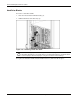
Removing the System Board Tray Assembly
The system board tray assembly must be removed from the chassis for the replacement of
some components, but is not required for all preparation procedures. Refer to the instructions
for replacing a specific option to determine whether the system board tray must be removed.
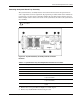
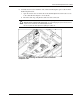
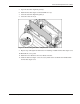
Refer to Figure 2-6 for connector locations on the system board. To remove the system board
tray assembly:
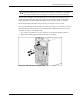
CAUTION: All power must be removed from the server blade before performing these
procedures.
Figure 2-6: System board tray assembly removal connector
locations
Table 2-1: System Board Tray Assembly Removal Connector Locations
Item Component User Task
1 PCI-X mezzanine slots Remove any installed PCI-X host-bus adapter cards
2 Fan cable Disconnect from the PCI-X mezzanine board
3 DC power converter Disconnect from system board
4 RJ-45 cables Disconnect from PCI-X mezzanine board
5 SCSI I2C cable Disconnect from SCSI backplane board and secure
to processor baffle
6 SCSI backplane power cable Disconnect from SCSI backplane board and secure
to processor baffle
7 SCSI cables Disconnect from system board and SCSI backplane
board
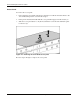
1. Remove the access panel. Refer to Figure 2-5 in this chapter.
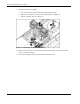
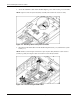
2. Remove any installed PCI-X host-bus adapter cards.
HP ProLiant BL40p Server Blade Maintenance and Service Guide 2-9