
HP ProLiant BL p-Class System Diagnostic Station User Guide
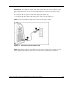
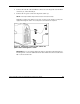
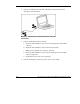
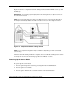

4. Connect an additional network cable with RJ-45 connectors between the
client PC (1) and the hub (2).
Figure 15: Connecting a network cable to the client PC
and the hub
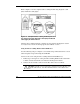
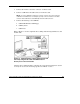
5. Connect the following items to the hub:
a. Network cable with RJ-45 connectors from the diagnostic station NIC 4
connector
b. Network cable with RJ-45 connectors from the client PC
c. DHCP server (optional), if not already connected
d. Network cable with RJ-45 connectors from the diagnostic station NIC 1
connector (optional)
e. Deployment server or file server (optional)
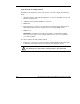
6. Connect the diagnostic station AC power cord to an AC outlet.
26 HP ProLiant BL p-Class System Diagnostic Station User Guide
HP CONFIDENTIAL
Writer: Amy Clute File Name: 230859-3.doc
Codename: Nipper Part Number: 230859-003 Last Saved On: 9/10/03 8:46 AM