
HP ProLiant BL p-Class System Diagnostic Station User Guide
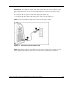
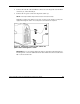
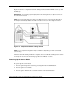

2. Connect the network cable with RJ-45 connectors to the diagnostic station NIC 4
connector (1), and to the hub (2).
3. Connect the AC power cord to the diagnostic station (3).
NOTE: Previously installed components have been removed for clarity.
Depending on which server blade you are using, you may need to install a second power
supply in the diagnostic station. A second power cord would also be required.
Figure 14: Connecting a network cable and the AC
power cord to the diagnostic station
IMPORTANT: If you are using the diagnostic station for operating system deployment or
file management, connect an additional network cable with RJ-45 connectors between the
NIC 1 connector and the hub.
HP ProLiant BL p-Class System Diagnostic Station User Guide 25
HP CONFIDENTIAL
Writer: Amy Clute File Name: 230859-3.doc
Codename: Nipper Part Number: 230859-003 Last Saved On: 9/10/03 8:46 AM