
HP ProLiant BL p-Class System Diagnostic Station User Guide
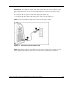
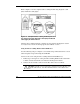
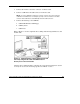
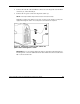
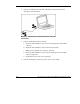
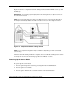

Refer to Figure 12 for the completed direct cabling method using diagnostic cable
(left) and the I/O cable (right).
Figure 12: Completed direct cabling method (front and
rear views) using the diagnostic cable (left) and the I/O
cable (right) to connect to iLO
After the direct cabling method is complete, the server blade and diagnostic station
are ready for use. See the “Powering Up the Server Blade” section.
Using the Direct Cabling Method with USB Devices
Use the following setup to configure a server blade using a SmartStart CD or to load
software updates and patches using the CD-ROM.
Connect to the server using the direct cabling method with USB devices:
1. Follow steps 1 through 7 of “Using the Direct Cabling Method with a Client PC”
to make connections from the server blade to the Diagnostic Station.
2. Connect the server blade connector on the I/O cable to the server blade.
CAUTION: Rear iLO connector performance degrades when the I/O cable or the
diagnostic cable is in use, even when the iLO connector on the cable is not in
use.
22 HP ProLiant BL p-Class System Diagnostic Station User Guide
HP CONFIDENTIAL
Writer: Amy Clute File Name: 230859-3.doc
Codename: Nipper Part Number: 230859-003 Last Saved On: 9/10/03 8:46 AM