
HP ProLiant BL p-Class System Diagnostic Station User Guide
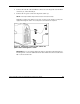

IMPORTANT: The diagnostic station ships with several AC power cords of different outlet
plug configurations. Be sure to select the proper AC power cord for the electrical service.
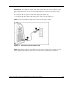
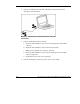
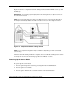
10. Connect the AC power cord to the diagnostic station (1).
11. Connect the other end of the AC power cord to an AC outlet (2).
NOTE: Previously installed components have been removed for clarity.
Figure 11: Connecting the AC power cord
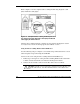
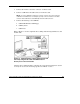
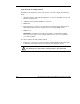
NOTE: Depending on which server blade you are using, you may need to install a second
power supply in the diagnostic station. A second power cord would also be required.
HP ProLiant BL p-Class System Diagnostic Station User Guide 21
HP CONFIDENTIAL
Writer: Amy Clute File Name: 230859-3.doc
Codename: Nipper Part Number: 230859-003 Last Saved On: 9/10/03 8:46 AM