
HP ProLiant BL p-Class System Diagnostic Station User Guide

20 HP ProLiant BL p-Class System Diagnostic Station User Guide
HP CONFIDENTIAL
Writer: Amy Clute File Name: 230859-3.doc
Codename: Nipper Part Number: 230859-003 Last Saved On: 10/3/03 11:09 AM
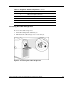
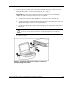
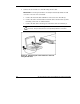
9. Connect the server blade to a client PC using the I/O cable.
IMPORTANT: Connecting the I/O cable to the I/O port automatically disables the iLO
connection on the rear of the server blade.
a. Connect the network cable with RJ-45 connectors to the client PC (1).
b. Connect the other end of the RJ-45 network cable to the I/O cable (2). The
remaining connectors can remain unused.
c. Connect the I/O cable to the I/O port on the front of the server blade (3).
CAUTION: Disconnect the diagnostic cable or the I/O cable from the port when
not in use. The port and connector do not provide permanent connections.
Figure 10: Connecting the server blade to a client PC
using the I/O cable