
HP ProLiant BL p-Class System Diagnostic Station User Guide

Using the Direct Cabling Method with a Client PC
NOTE: Items in addition to those provided with the diagnostic station may be required.
Additional items will be noted in the option kits they ship with.
NOTE: The server blade in the illustrations may look different from the model you are using.
WARNING: To avoid electric shock, be sure that the AC power is disconnected
from the diagnostic station when connecting cables to the server blade.
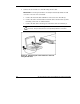
To connect a client PC to the server using the direct cabling method:
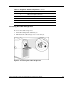
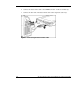
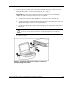
1. Thread the DC power cord for a server blade through the opening in the VHDM
converter (1).
2. Snap the cord into place in the VHDM converter (2).
Figure 6: Threading the DC power cord through the
VHDM converter
16 HP ProLiant BL p-Class System Diagnostic Station User Guide
HP CONFIDENTIAL
Writer: Amy Clute File Name: 230859-3.doc
Codename: Nipper Part Number: 230859-003 Last Saved On: 9/10/03 8:46 AM