
HP ProLiant BL p-Class System Diagnostic Station User Guide

Client PC Requirements
Observe the following minimum software and hardware requirements for a client PC:
• Intel® Pentium® III or higher processor (700 MHz or greater recommended)
• 128 MB of RAM
• Microsoft® Windows® 2000 Professional or Microsoft Windows XP operating
system
• Microsoft Internet Explorer 5.5 or above with 128-bit encryption
• Ethernet NIC with 10/100 RJ-45 connector
• TCP/IP networking and an IP address compatible with one of the following:
— iLO diagnostic port static IP address: 192.168.1.1, mask 255.255.255.0
— Assigned DHCP or static IP address
• Any of the following Java Runtime Environment versions:
— 1.3.1_02
— 1.3.1_07
— 1.3.1_08
— 1.4.1
Access the Java Runtime Environment versions at
http://java.sun.com/products/archive/index.html
Server Blade
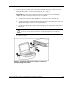
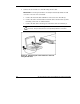
Use the following information to connect the diagnostic station to a server blade.
Preparing the Server Blade for Connection
Before connecting the diagnostic station to a server blade:
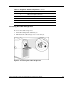
1. Power down the server blade.
2. Remove the server blade from the server blade enclosure in the rack.
14 HP ProLiant BL p-Class System Diagnostic Station User Guide
HP CONFIDENTIAL
Writer: Amy Clute File Name: 230859-3.doc
Codename: Nipper Part Number: 230859-003 Last Saved On: 9/10/03 8:46 AM