
HP ProLiant BL p-Class System Diagnostic Station User Guide
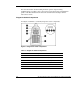
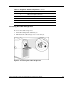
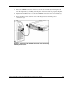
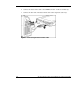
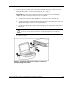
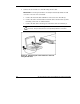

Table 3: Diagnostic Station Components continued
Item Description
7 DC power output connectors
8 Data transfer port
9 NIC LEDs
10 Power On/Off button
11 Power and health LED
Accessing the Cable Storage Area
To access the cable storage area:
1. Turn the locking latch clockwise (1).
2. Pull down the cable storage area access door (2).
Figure 5: Accessing the cable storage area
HP ProLiant BL p-Class System Diagnostic Station User Guide 13
HP CONFIDENTIAL
Writer: Amy Clute File Name: 230859-3.doc
Codename: Nipper Part Number: 230859-003 Last Saved On: 9/10/03 8:46 AM