
HP ProLiant BL30p Server Blade Setup and Installation Guide

Server Blade Troubleshooting
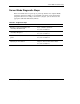
Server Blade Diagnostic Steps
If the server blade does not power up, or powers up but does not complete POST,
answer the questions in Table A-1 to determine appropriate actions based on the
symptoms observed. According to the answers you give, you are directed to the
appropriate table that immediately follows.
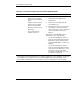
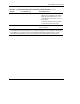
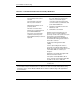
Table A-1: Diagnostic Steps
Question Action
Question 1: Is the server blade power
on/standby LED illuminated?
If yes, continue to question 2.
If no, refer to Table A-2.
Question 2: Is the server blade power
on/standby LED green?
If yes, continue to question 3.
If no, refer to Table A-3.
Question 3: Is the server blade health LED solid
green?
If yes, continue to question 4.
If no, refer to Table A-4.
Question 4: Is the iLO remote console
displaying error information?
If yes, use the POST messages for further
diagnosis. Refer to Table A-5 for details.
If no, refer to Table A-5.
HP ProLiant BL30p Server Blade Setup and Installation Guide A-5