
HP ProLiant BL30p Server Blade Setup and Installation Guide

Server Blade Component Identification
Front Panel LEDs, Button, and Port
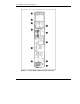
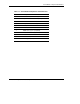
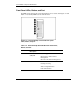
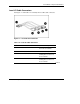
Six LEDs on the front of the server blade indicate server status. Use Figure 1-2 and
Table 1-2 to identify LED locations and functions.
Figure 1-2: ProLiant BL30p server blade front panel
LEDs, button, and port
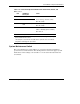
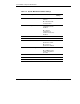
Table 1-2: ProLiant BL30p Server Blade Front Panel LEDs,
Button, and Port
Item LED/Button
Description
Status
1 Unit Identification
(UID) LED
Blue = Flagged
Blue flashing = Active Remote
Management
Off = No Active Remote Management
2 Health LED Green = Normal status
Flashing = Booting
Amber = Degraded status
Red = Critical status
continued
1-4 HP ProLiant BL30p Server Blade Setup and Installation Guide