
HP ProLiant BL2x220c G7 Server Blade Maintenance and Service Guide

Removal and replacement procedures 30
CAUTION: The heatsink thermal interface media is not reusable and must be replaced if the
heatsink is removed from the processor after it has been installed.
CAUTION: To avoid damage to the server blade, do not operate the server blade unless both
processor sockets are populated with a processor and heatsink.
IMPORTANT: When installing the heatsink, align the guide pins on the processor retention
bracket with the alignment holes in the heatsink.
NOTE: Do not discard the processor protective cover. Always install the processor protective
cover if the processor is removed from the socket.
To remove the component:
1. Power down the server blade (on page 21).
2. Remove the server blade (on page 22).
3. Access the internal server components (on page 23).
CAUTION: To avoid damage to the system board, alternate removing or tightening the heatsink
screws.
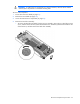
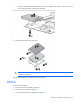
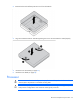
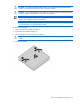
4. Remove the heatsink.