
HP ProIiant BL2x220c G6 Server Blade Maintenance and Serivce Guide

Removal and replacement procedures 28
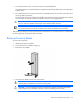
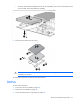
4.
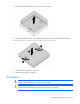
Open the DIMM slot latches.
5. Remove the DIMM.
To replace the component, reverse the removal procedure.
SD card adapter
WARNING: To reduce the risk of personal injury from hot surfaces, allow the drives and the
internal system components to cool before touching them.
To remove the component:
1. Power down the server blade (on page 22).
2. Remove the server blade (on page 23).
3. Access the internal server components (on page 24).
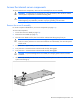
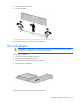
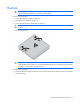
4. Remove the SD card adapter.
To replace the component, reverse the removal procedure.