
HP ProLiant BL2x220c Generation 5 Server Blade Installation Instructions
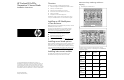

For detailed port mapping information, see the HP BladeSyste
m
enclosure installation poster or
the HP BladeSystem enclosure setup
and installation guide on the HP website
(http://www.hp.com/go/bladesystem/documentation
).
Connecting to the network
To connect the HP BladeSystem to a network, each enclosure must
be configured with network interconnect devices to manage signals
between the server blades and the external network.
Two types of interconnect modules
are available for HP BladeSystem
c-Class enclosures: Pass-thru module
s and switch modules. For more
information about interconnect module options, see the HP w
ebsite
(http://www.hp.com/go/bladesystem/interconnects
).
Installing a server blade
CAUTION:
To prevent improper cooling and thermal
damage, do not operate the se
rver blade enclosure unless
all bays are populated with either a component or a
blank.
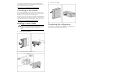
1. Remove the device bay blank.
2.
Remove the enclosure connector cover.
3.
Install the server blade.
Completing the configuration
To complete the server blade and
HP BladeSystem configuration, see
the overview card that ships with the enclosure.