HP ProLiant BL280c G6 Server Blade User Guide
Manuals
Brands
HP Manuals
Server
HP ProLiant BL280c Server Blade
31
32
33
34
35
36
37
38
39
40
Hardware
options installation
34
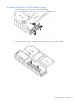
A
ir baffle configuration for 8
-
GB DIM
Ms or larger
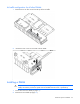
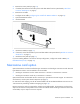
1.
Remove the air flow c
over from each end
of the air baff
le.
2.
To store the air flow covers, insta
ll the two air flow covers on th
e top of the air baffle.
1
...
...
32
33
34
35
36
...
...
108