
HP ProLiant BL280c G6 Server Blade Maintenance and Service Guide


Removal and replacement procedures 44
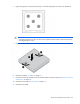
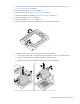
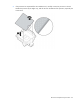
6. Apply all the grease to the top of the processor in the following pattern to ensure even distribution.
CAUTION: To avoid damage to the system board, processor socket, and screws, do not
overtighten the heatsink screws. Use the wrench supplied with the system to reduce the possibility
of overtightening the screws.
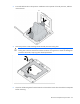
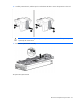
7. Align and install the heatsink. Alternate tightening the screws until the heatsink is seated properly.
8. Install the air baffle ("Air baffle" on page 25).
9. If removed, connect the hard drive power and data cables to the system board ("Hard drive connector
identification" on page 66).
10. Install the access panel ("Access panel" on page 25).
11. Install the server blade.