
HP ProLiant BL280c G6 Server Blade Maintenance and Service Guide


Removal and replacement procedures 39
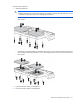
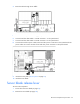
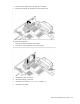
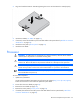
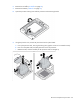
3. Align and install the heatsink. Alternate tightening the screws until the heatsink is seated properly.
4. Install the air baffle ("Air baffle" on page 25).
5. If removed, connect the hard drive power and data cables to the system board ("Hard drive connector
identification" on page 66).
6. Install the access panel ("Access panel" on page 25).
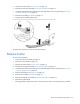
7. Install the server blade.
Processor
WARNING: To reduce the risk of personal injury from hot surfaces, allow the drives and the
internal system components to cool before touching them.
CAUTION:
To prevent possible server malfunction, do not mix processors of different speeds or
cache sizes. Refer to the label on the processor heatsink for a description of the processor.
CAUTION: To prevent possible server blade overheating, always populate each processor
socket with a processor socket cover and a heatsink blank or a processor and a heatsink.
IMPORTANT:
Processor socket 1 must always be populated. If processor socket 1 is empty, the
server blade does not power up.
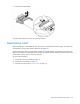
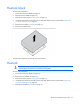
To remove the component:
1. Update the system ROM.
Locate and download the latest ROM version from the HP website (http://www.hp.com/support).
Follow the instructions on the website to update the system ROM.
2. Power down the server blade (on page 23).
3. Remove the server blade (on page 24).
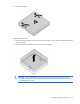
4. Remove the access panel ("Access panel" on page 25).
5. If installed, disconnect the hard drive power and data cables from the system board ("Hard drive
connector identification" on page 66).