
HP ProLiant BL280c G6 Server Blade Maintenance and Service Guide

Removal and replacement procedures 30
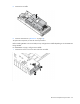
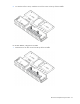
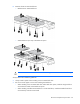
8. Remove all SAS or SATA hard drives:
o Midline SAS or SATA hard drives
o SATA hard drives (9.5 mm) with hard drive spacer
CAUTION: Failure to follow the hard drive installation guidelines can cause hardware damage.
Always observe the installation guidelines:
• Always install a spacer when installing a 9.5-mm SATA hard drive.
• Be sure to use the proper screws when installing the hard drive:
o When installing a 9.5-mm SATA hard drive and a hard drive spacer, install the long hard drive
screws that are stored on the hard drive spacer.
o When installing a midline SATA hard drive or a SAS hard drive, install the standard hard drive
screws that ship with the server blade.