
HP ProLiant BL280c G6 Server Blade Maintenance and Service Guide

Removal and replacement procedures 29
IMPORTANT: This server blade does not support mixing RDIMMs and UDIMMs. Attempting to
mix these two types causes the server to halt during BIOS initialization.
To identify the DIMMs installed in the server blade, see "DIMM identification (on page 65)."
To remove the component:
1. Power down the server blade (on page 23).
2. Remove the server blade (on page 24).
3. Remove the access panel ("Access panel" on page 25).
4. If installed, disconnect the hard drive power and data cables from the system board ("Hard drive
connector identification" on page 66).
5. Remove the air baffle ("Air baffle" on page 25).
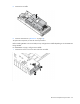
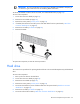
6. Remove the DIMM.
To replace the component, reverse the removal procedure.
Hard drive
This section shows procedures for replacing both hard drives in the server blade. Replace only the failed hard
drive.
To remove the component:
1. Back up all server data on the hard drive.
2. Power down the server blade (on page 23).
3. Remove the server blade (on page 24).
4. Remove the access panel ("Access panel" on page 25).
5. Disconnect the hard drive power and data cables from the system board ("Hard drive connector
identification" on page 66).
6. Remove the air baffle ("Air baffle" on page 25).
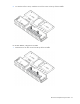
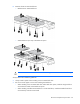
7. Disconnect all hard drive cables ("Hard drive connector identification" on page 66).