
Processor Option Installation Instructions for HP ProLiant BL260c Generation 5 Server Blades
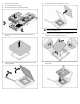

12. Press down firmly until the processor installation tool clicks and
separates from the processor, and then remove the processor
installation tool.
13. Close the processor socket retaining bracket and the processor
retaining latch.
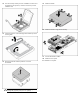
14. Remove the thermal interface protective cover from
the heatsink.
CAUTION: Heatsink retaining screws should be tightened
in diagonally opposite pairs (in an "X" pattern).
15. Install the heatsink.
16. Install the hard drive cage/bezel assembly.
17. Connect all hard drive cables.
18. Install the access panel.
The installation is complete.