
Processor Option Installation Instructions for HP ProLiant BL260c Generation 5 Server Blades
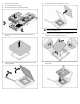

4. Remove the access panel.
5. Disconnect all hard drive cables.
6. Remove the hard drive cage/bezel assembly.
7. Remove the heatsink blank. Retain the heatsink blank for
future use.
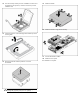
8. Open the processor retaining latch and the processor socket
retaining bracket.
9. Remove the processor socket protective cover.
IMPORTANT: Be sure the processor remains inside the
processor installation tool.
10. If the processor has separated from the installation tool,
carefully re-insert the processor in the tool.
11. Align the processor installation tool with the socket and install
the processor.