
HP ProLiant BL260c Generation 5 Server Blade Maintenance and Service Guide
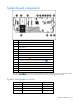
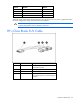
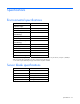
Table Of Contents
- HP ProLiant BL260c Generation 5 Server Blade Maintenance and Service Guide
- Notice
- Contents
- Customer self repair
- Illustrated parts catalog
- Removal and replacement procedures
- Cabling
- Diagnostic tools
- Component identification
- Specifications
- Acronyms and abbreviations
- Index
Component identification 56
Position Function Default
5 Password disabled Off
6 Reset configuration Off
7 Reserved Off
8 Reserved Off
When the system maintenance switch position 6 is set to the On position, the system is prepared to erase
all system configuration settings from both CMOS and NVRAM.
CAUTION: Clearing CMOS and/or NVRAM deletes configuration information. Be sure to
properly configure the server or data loss could occur.
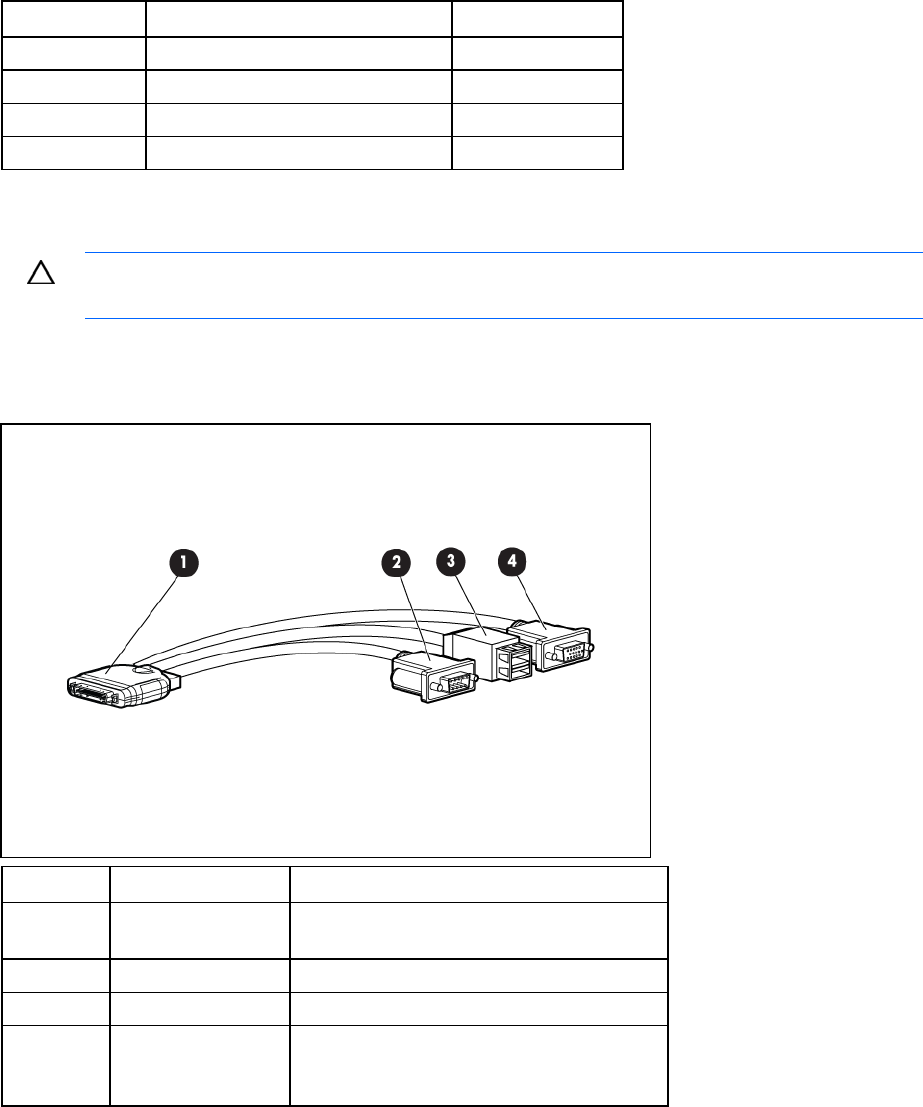
HP c-Class Blade SUV Cable
Item Connector Description
1 Server blade For connecting to the SUV connector on the
server blade front panel
2 Video For connecting a video monitor
3 USB For connecting up to two USB devices
4 Serial For trained personnel to connect a null modem
serial cable and perform advanced diagnostic
procedures