
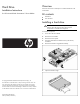
Hard Drive Installation Instructions for HP ProLiant BL260c Generation 5 Server Blades
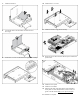

7. Install the hard drive.
8. Connect the cable to the hard drive and close the hard
drive cage.
9. Locate the T-15 screws on the hard drive cage/bezel assembly.
10. Install the four T-15 screws.
11. Install the hard drive cage/bezel assembly.
12. Route and connect the hard drive data and power cable to the
system board.
13. Install the access panel.
14. Install the server blade.
15. Determine the status of the hard drive from the hard drive
activity LED. For more LED information, see the server user
guide on the HP website (http://www.hp.com/support
).
The installation is complete.