
ProLiant BL25p Server Blade Maintenance and Service Guide



Server component identification 36
IMPORTANT: When the server blade boots after NVRAM is cleared, a delay of up to 2 minutes is normal.
During this delay, the system appears non-functional. Do not attempt any procedures during the delay.
Accessing the redundant ROM
If the system ROM is corrupted, you can set the system to use the backup version or redundant ROM.
To use the redundant ROM:
1. Power down the server blade and disconnect the server blade from all power sources ("Server blade
preparation" on page 11).
2. Remove the access panel ("Access panel" on page 12).
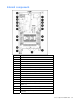
3. Change positions 1, 5, and 6 of SW1 to on.
4. Install the access panel ("Access panel" on page 12).
5. Connect the server blade to system power and power up the server blade ("Server blade
preparation" on page 11).
6. Repeat steps 1 through 3.
7. Change positions 1, 5, and 6 of SW1 to off.
8. Repeat steps 5 through 7.
If both the current and backup versions of the ROM are corrupt, you must return the system board for a
service replacement.
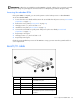
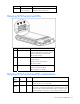
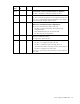
Local I/O cable
Item Connector Description
1 Local I/O
For connecting to the local I/O port on the
server blade front panel
2 Video For connecting a video monitor
3 USB 1 For connecting a USB device
4 USB 2 For connecting a USB device
5 Serial
For trained personnel to connect a null modem
serial cable and perform advanced diagnostic
procedures