
HP ProLiant BladeSystem p-Class System Maintenance and Service Guide




Removal and Replacement Procedures 45
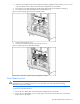
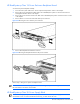
Figure 2-22 Removing the 1U power management module
Reverse steps 1 through 3 to replace the power management module.
HP BladeSystem p-Class 1U Power Enclosure
To remove a power enclosure:
1. Remove power from the AC Power source. Refer to the “Power Components Preparation” section in this chapter.
2. Disconnect the PDU jumper cords from the power enclosure.
3. Disconnect the power enclosure DC output cables from the server blade enclosure.
4. Remove all hot-plug power supplies. Refer to the “HP BladeSystem p-Class 1U Power Supply” section in this
chapter.
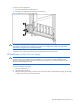
5. Remove the thumbscrew covers (1).
6. Loosen the front panel thumbscrews (2).
7. Slide the power enclosure out (3).
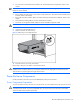
Figure 2-23 Removing a 1U power enclosure
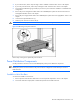
8. Disengage the rack rails from the enclosure.
9. Remove the enclosure from the rack.
WARNING! At least two people must lift an enclosure together when removing it from the rack.
Reverse steps 1 through 9 to replace the power enclosure.