
HP ProLiant BladeSystem p-Class System Maintenance and Service Guide



Removal and Replacement Procedures 35
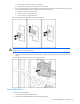
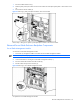
1. Press the module release lever (1).
2. Slide the patch panel RJ-45 module or interconnect module out of the RJ-45 patch panel or interconnect switch
(2).
3. Disconnect the network cables (3).
Figure 2-7 Removing a patch panel RJ-45 module or interconnect module
Reverse steps 1 through 3 to replace a patch panel RJ-45 module or interconnect module.
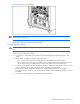
Enhanced Server Blade Enclosure Backplane Components
Server Blade Management Module
To remove the server blade management module:
1. Disconnect any management cables connected to the server blade management module.
NOTE: This component is hot-plug capable.
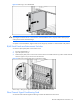
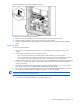
2. Loosen the thumbscrew securing the server blade management module (1).
3. Press the release tabs at either end of the module (2).
4. Pull the module away from the enclosure (3).
Figure 2-8 Removing a server blade management module
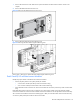
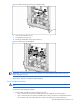
To replace the server blade management module: