
HP ProLiant BL25p Generation 2 Server Blade Maintenance and Service Guide






Cabling 64
NOTE: For this configuration, a USB hub is not necessary. To connect additional devices, use
a USB hub.
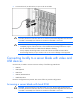
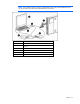
1. Connect the local I/O cable to the server blade ("Local administration using iLO 2" on page 62).
2. Connect the video connector to a monitor.
3. Connect a USB mouse to one USB connector.
4. Connect a USB keyboard to the second USB connector.
Item Description
1 Monitor
2 USB mouse
3 USB keyboard
4 Local I/O cable
Accessing local media devices
Use the following configuration when configuring a server blade or loading software updates and
patches from a CD-ROM, such as the SmartStart CD, or a diskette.
CAUTION: Disconnect the local I/O cable when not in use. The port and connector do not
provide a permanent connection. Rear iLO 2 connector performance degrades when the local
I/O cable is connected, even if the iLO 2 connector on the cable is not in use.
1. Connect the local I/O cable to the server blade.
2. Connect the video connector to a monitor.
3. Connect a USB hub to one USB connector.
4. Connect the following to the USB hub:
o USB CD-ROM drive
o USB keyboard
o USB mouse