
HP ProLiant BL25p Generation 2 Server Blade Maintenance and Service Guide






Cabling 63
2.
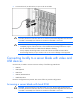
Connect the local I/O cable to the I/O port on the server blade.
CAUTION: Disconnect the local I/O cable when not in use. The port and connector do not
provide a permanent connection. Rear iLO 2 connector performance degrades when the local
I/O cable is connected, even if the iLO 2 connector on the cable is not in use.
CAUTION: Before disconnecting the local I/O cable, observe the following guidelines:
• Completely log out of the current iLO 2 session before disconnecting from the iLO 2 port.
Do not remove the local I/O cable when the UID LED is flashing.
• Always squeeze the locking buttons on the side of the server blade connector before
disconnecting from the I/O port. Failure to do so can result in damage to the equipment.
Connecting locally to a server blade with video and
USB devices
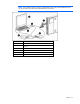
Use the local I/O cable to connect a monitor and any of the following USB devices:
• USB hub
• USB keyboard
• USB mouse
• USB CD/DVD-ROM drive
• USB diskette drive
Numerous configurations are possible. This section offers two possible configurations.
Accessing a server blade with local KVM
CAUTION: Disconnect the local I/O cable when not in use. The port and connector do not
provide a permanent connection. Rear iLO 2 connector performance degrades when the local
I/O cable is connected, even if the iLO 2 connector on the cable is not in use.