
HP ProLiant BL25p Generation 2 Server Blade Maintenance and Service Guide






Removal and replacement procedures 28
CAUTION: Always align the cable before closing the connector. Failure to align the cable
properly can result in damage to the cable or the connector.
To replace the component, reverse the removal procedure.
Power button/LED board
To remove the component:
1. Power down the server blade (on page 24).
2. Remove the server blade (on page 24).
3. Remove the access panel ("Access panel" on page 25).
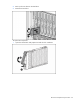
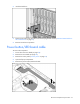
4. Remove the power button/LED board cable ("Power button/LED board" on page 28).
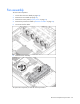
5. Remove the two T-5 screws and the power button/LED board.
To replace the component, reverse the removal procedure.
Front bezel
To remove the component:
1. Power down the server blade (on page 24).
2. Remove the server blade (on page 24).
3. Remove the access panel ("Access panel" on page 25).
4. Disconnect the power button/LED board cable ("Power button/LED board cable" on page 27).
5. Remove the power button/LED board ("Power button/LED board" on page 28).