
HP ProLiant BL20p Generation 4 Server Blade Maintenance and Service Guide

Removal and replacement procedures 47
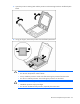
b.
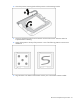
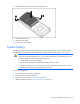
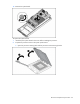
Remove the processor socket protective cover.
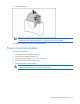
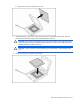
3. Install the processor socket cover onto the processor socket of the failed system board. The cover
protects the socket during shipping when the failed board is returned.
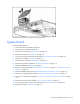
CAUTION: The processor is designed to fit one way into the socket. Use the alignment guides
on the processor and socket to properly align the processor with the socket. Refer to the server
blade hood label for specific instructions.
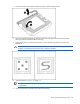
CAUTION: Always install the processor parallel to the system board to avoid damage to the
pins.
4. Install the processor on the spare system board.