
HP ProLiant BL20p Generation 4 Server Blade Maintenance and Service Guide

Removal and replacement procedures 38
CAUTION: To prevent possible server blade overheating, always populate processor socket 2
with a processor and a heatsink or a processor cover and a heatsink blank.
IMPORTANT: Processor socket 1 must always be populated. If processor socket 1 is empty, the
server blade does not power up.
To remove the component:
1. Power down the server blade (on page 24).
2. Remove the server blade (on page 24).
3. Remove the access panel ("Access panel" on page 25).
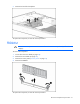
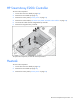
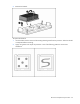
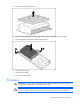
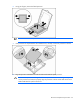
4. Remove the processor heatsink.
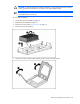
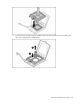
5. Open the processor retaining latch and the processor socket retaining bracket.