
HP ProLiant BL20p Generation 4 Server Blade Maintenance and Service Guide

Removal and replacement procedures 23
WARNING: This server blade enclosure is very heavy. To reduce the risk of personal injury or
damage to the equipment:
• Observe local occupational health and safety requirements and guidelines for manual
material handling.
• Get help to lift and stabilize the product during installation or removal, especially when the
product is not fastened to the rails. When the server blade enclosure weighs more than
22.5 kg (50 lb), at least two people must lift the server blade enclosure into the rack
together. A third person may be required to help align the server blade enclosure if the
server blade is installed higher than chest level.
• Use caution when installing the server blade enclosure in or removing the server blade
enclosure from the rack; it is unstable when not fastened to the rails.
WARNING: To reduce the risk of personal injury from hot surfaces, allow the drives and the
internal system components to cool before touching them.
CAUTION: Protect the server from power fluctuations and temporary interruptions with a
regulating uninterruptible power supply (UPS). This device protects the hardware from damage
caused by power surges and voltage spikes and keeps the system in operation during a power
failure.
CAUTION: Do not operate the server blade for long periods with the access panel open or
removed. Operating the server blade in this manner results in improper airflow and improper
cooling that can lead to thermal damage.
Symbols on equipment
The following symbols may be placed on equipment to indicate the presence of potentially hazardous
conditions.
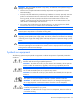
This symbol indicates the presence of hazardous energy circuits or electric shock
hazards. Refer all servicing to qualified personnel.
WARNING: To reduce the risk of injury from electric shock hazards, do not open this
enclosure. Refer all maintenance, upgrades, and servicing to qualified personnel.
This symbol indicates the presence of electric shock hazards. The area contains no
user or field serviceable parts. Do not open for any reason.
WARNING: To reduce the risk of injury from electric shock hazards, do not open this
enclosure.
This symbol on an RJ-45 receptacle indicates a network interface connection.
WARNING: To reduce the risk of electric shock, fire, or damage to the equipment,
do not plug telephone or telecommunications connectors into this receptacle.
This symbol indicates the presence of a hot surface or hot component. If this surface is
contacted, the potential for injury exists.
WARNING: To reduce the risk of injury from a hot component, allow the surface to
cool before touching.