
ProLiant BL20p Generation 3 Server Blade User Guide


Server Blade Configuration and Utilities
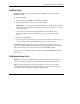
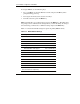
Table 5-1: RBSU Default Settings continued
Menu/Option Default Setting
Wake-on LAN Enabled
POST Speed Up Enabled
POST F1 Prompt Enabled
Power Button Enabled
Fan Redundancy Enabled
Server Passwords
Set Power-On Password Disabled
Set Admin Password Disabled
BIOS Serial Console & EMS
BIOS Serial Console Port Auto
BIOS Serial Console Baud Rate 9600
EMS Console COM 1; IRQ 4
BIOS Interface Mode Auto
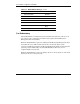
Server Asset Text
Server Info Text
Administrator Info Text
Service Contact Text
Custom Post Message Disabled
Advanced Options
MPS Table Mode AutoSet Table
ROM Selection Use Current ROM
Erase Non-Volatile Memory Disabled
Erase NVRAM/Boot Disk Disabled
NMI Debug Button Enabled
Processor Hyper-Threading Enabled
HP ProLiant BL20p Generation 3 Server Blade User Guide 5-9
continued