
HP ProLiant BL20p Generation 3 Server Blade Maintenance and Service Guide

Removal and Replacement Procedures
HP ProLiant BL20p Generation 3 Server Blade Maintenance and Service Guide 2-21
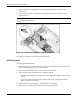
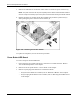
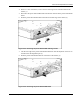
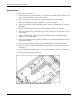
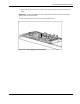
6. Remove the plastic air baffle (1)(2).
7. Disconnect the SCSI backplane signal cable from the system board (3).
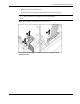
CAUTION: Be sure the LED board cable is not disengaged when removing the fan baffle.
When reinstalling the fan baffle, be sure cable is fully seated.
NOTE: The fan baffle is most easily removed at a 45˚ angle.
Figure 2-19: Removing the fan baffle and disconnecting the SCSI
backplane cable