
HP ProLiant BL20p Generation 3 Server Blade Maintenance and Service Guide

Removal and Replacement Procedures
HP ProLiant BL20p Generation 3 Server Blade Maintenance and Service Guide 2-5
To service internal server blade components:
1. Identify the proper server blade in the server blade enclosure.
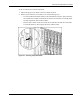
2. Remove power from the server blade in one of the following ways:
— Use the Virtual Power Button feature in the iLO Remote Console to power down the
server blade from a remote location. Be sure that the server blade is in standby mode
by observing that the power LED is amber.
— Press the power button on the front of the server blade. Be sure that the server blade
is in standby mode by observing that the power LED is amber.
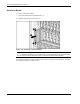
Figure 2-1: Pressing the power button