
HP ProLiant BL20p Generation 2 Server Blade Setup and Installation Guide

Troubleshooting
D-14 HP ProLiant BL20p Generation 2 Server Blade Setup and Installation Guide
HP CONFIDENTIAL
Writer: Amy Clute File Name: g-appd Troubleshooting.doc
Codename: Nipper Part Number: 307158-002 Last Saved On: 9/8/03 2:15 PM
•
•
•
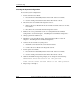
b. Use the virtual power button feature in the iLO remote console.
As soon as the server blade powers up, it emits two beeps.
8. Repeat steps 1 through 3.
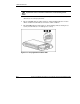
9. Change positions 1, 5 and 6 of SW4 to off.
10. Repeat steps 5 through 7.
If both the current and backup versions of the ROM are corrupt, you must return the
system board for a service replacement. Refer to the HP ProLiant BL p-Class System
Maintenance and Service Guide and contact an authorized reseller.
Problems After Initial Boot
Once the server blade has passed POST, you may still encounter errors, such as an
inability to load the operating system. Reinstall the operating system and use the
documentation that ships on the ProLiant Rapid Deployment Pack CD or refer to
“Software Problems” in the HP ProLiant Servers Troubleshooting Guide for more
information.
Refer to the HP ProLiant Servers Troubleshooting Guide for the following:
Information you need to collect when diagnosing software problems and to
provide when contacting support
Instructions on how to upgrade the operating system and its drivers
Information about available recovery options and advice on minimizing
downtime