
HP ProLiant BL20p Generation 2 Server Blade Setup and Installation Guide

Troubleshooting
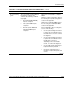
Table D-4: Is the Server Blade Health LED Solid Green? continued
Answer Possible Reasons Possible Solutions
No, it is red A processor has failed.
Processor 1 is not installed.
A processor is an unsupported
type.
Processors are mismatched
(speed and/or type).
A PPM has failed.
A PPM is not installed.
A DIMM has experienced a
multibit error.
No valid memory is available in
the system. Populated banks
have mismatched DIMMs.
No valid memory is available in
the system. Populated banks
have missing DIMMs.
No valid memory is available in
the system. Populated banks
have unsupported DIMM types.
One or both fans have failed.
An overtemperature condition has
occurred.
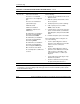
Do the following:
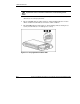
1. Remove the server blade from the server
blade enclosure.
2. With the system powered down, remove
the access panel.
3. Visually inspect the system for damage.
4. Add or replace processors, PPMs
DIMMs, and/or the fans.
5. Verify the proper connections among the
power converter module, system board,
SCSI backplane, and power button/LED
board.
6. Reinstall and power up the server blade.
If the health LED is still not solid green, do
one of the following:
• Use the optional diagnostic station to
power the server blade and use the iLO
remote console to continue the
diagnosis.
• Use the optional diagnostic station to
power the server blade and use the I/O
cable connectors, depending on the
server blade model, to continue your
diagnosis.
• Use the iLO system status page to help
determine the problem.
• Contact an authorized service provider
for replacement parts and service.
Yes If the health LED is green, refer to Table D-5.
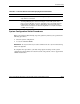
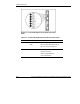
Note: For LED locations and functions, refer to Appendix E, “LEDs and Switches.” For cabling
configurations, refer to the cabling and powering up section in the HP ProLiant BL p-Class System
Setup and Installation Guide.
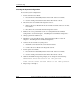
D-10 HP ProLiant BL20p Generation 2 Server Blade Setup and Installation Guide
HP CONFIDENTIAL
Writer: Amy Clute File Name: g-appd Troubleshooting.doc
Codename: Nipper Part Number: 307158-002 Last Saved On: 9/8/03 2:15 PM