
HP ProLiant BL20p Generation 2 Server Blade Setup and Installation Guide

Configuring and Deploying Server Blades
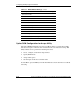
Table 2-1: RBSU Default Settings continued
Menu/Option Default Setting
Server Passwords
Set Power-On Password Disabled
Set Admin Password Disabled
Advanced Options
MPS Table Mode AutoSet Table
POST Speed Up Enabled
POST F1 Prompt Enabled
ROM Selection Use Current ROM
Wake-on LAN Enabled
NMI Debug Button Enabled
Processor Hyper-Threading Enabled
Virtual Install Disk Disabled
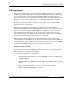
Option ROM Configuration for Arrays Utility
The Option ROM Configuration for Arrays (ORCA) utility is a menu-driven utility
that does not require a CD and can be started when the server blade is booting. This
utility enables users to perform the following functions:
•
•
•
•
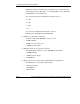
Create, configure, and/or delete logical drives
Specify RAID levels
Assign online spares
Set interrupts and the boot controller order
To run ORCA, press the F8 key from the iLO Remote Console when the server blade
is booting.
2-16 HP ProLiant BL20p Generation 2 Server Blade Setup and Installation Guide
HP CONFIDENTIAL
Writer: Amy Clute File Name: c-ch2 Configuring and Deploying Server Blades.doc
Codename: Nipper Part Number: 307158-00 Last Saved On: 9/8/03 2:12 PM