
HP ProLiant BL20p Generation 2 Server Blade Setup and Installation Guide

Installing the Server Blade and Options
HP ProLiant BL20p Generation 2 Server Blade Setup and Installation Guide 1-37
HP CONFIDENTIAL
Writer: Amy Clute File Name: b-ch1 Installing the Server Blade and Options.doc
Codename: Nipper Part Number: 307158-002 Last Saved On: 9/8/03 2:09 PM
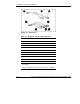
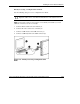
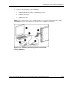
4. Connect the following to the USB hub:
a. USB CD-ROM (4) and/or a USB floppy drive
b. USB keyboard (5)
c. USB mouse (6)
NOTE: HP recommends the use of a USB hub when connecting a USB floppy and/or USB
CD-ROM drive to the server blade. This provides more available connections.
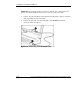
Figure 1-27: Directly connecting to the server blade
using a USB hub