
HP ProLiant BL20p Generation 2 Server Blade Setup and Installation Guide

Installing the Server Blade and Options
Directly Accessing a Configured Server Blade
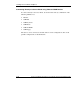
Use the following setup to access a configured server blade:
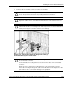
CAUTION: Rear iLO connector performance degrades when the I/O cable or the
diagnostic cable is in use, even when the iLO connector on the cable is not in use.
NOTE: For this setup, a hub is not necessary to connect directly to the blade. If you need
additional connections, use the second setup.
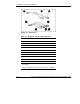
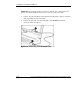
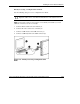
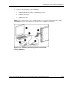
1. Connect the I/O cable to the server blade (1).
2. Connect the video connector to a monitor (2).
3. Connect a USB mouse to the USB connector (3).
4. Connect a USB keyboard to the USB connector (4).
Figure 1-26: Directly accessing a configured server
blade
HP ProLiant BL20p Generation 2 Server Blade Setup and Installation Guide 1-35
HP CONFIDENTIAL
Writer: Amy Clute File Name: b-ch1 Installing the Server Blade and Options.doc
Codename: Nipper Part Number: 307158-002 Last Saved On: 9/8/03 2:09 PM