
HP ProLiant BL20p Generation 2 Server Blade Setup and Installation Guide

Installing the Server Blade and Options
Connecting Directly to a Server Blade using Video and USB Devices
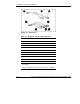
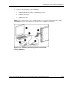
To connect directly to the server blade, use the I/O cable and any combination of the
following USB devices:
•
•
•
•
•
•
Monitor
USB Hub
USB Keyboard
USB Mouse
USB CD-ROM
USB Floppy
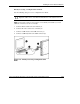
The devices can be connected to the I/O cable in various configurations. Two of the
possible configurations are detailed below:
1-34 HP ProLiant BL20p Generation 2 Server Blade Setup and Installation Guide
HP CONFIDENTIAL
Writer: Amy Clute File Name: b-ch1 Installing the Server Blade and Options.doc
Codename: Nipper Part Number: 307158-002 Last Saved On: 9/8/03 2:09 PM