
HP ProLiant BL20p Generation 2 Server Blade Setup and Installation Guide

Installing the Server Blade and Options
Using the Diagnostic Cable or the Local I/O Cable
Use either the diagnostic cable or the I/O cable to perform some server blade
configuration and diagnostic procedures. Depending on the model, the server blade
has either a diagnostic port or an I/O port. The I/O port only accepts the I/O cable and
the diagnostic port only accepts the diagnostic cable. If the server blade has an I/O
icon next to the port on the front of the server blade, use the I/O cable. If the port has
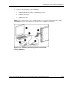
no icon, use the diagnostic cable. Refer to Figure 1-22 to identify the I/O icon.
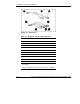
Figure 1-22: I/O cable with large view of the I/O icon
Identifying Diagnostic and I/O Cable Connectors
Use Figure 1-23 and Table 1-2 to identify the diagnostic cable and I/O cable
connectors.
HP ProLiant BL20p Generation 2 Server Blade Setup and Installation Guide 1-29
HP CONFIDENTIAL
Writer: Amy Clute File Name: b-ch1 Installing the Server Blade and Options.doc
Codename: Nipper Part Number: 307158-002 Last Saved On: 9/8/03 2:09 PM