
HP ProLiant BL20p Generation 2 Server Blade Setup and Installation Guide

Installing the Server Blade and Options
To install a new processor:
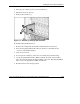
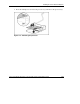
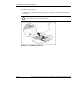
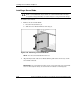
1. Install the processor with the edges properly aligned (1), and lower the locking
lever (2).
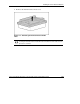
CAUTION: When installing the processor into the socket, be sure that the locking
lever is fully raised to avoid damaging pins.
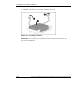
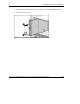
Figure 1-16: Installing a processor
1-22 HP ProLiant BL20p Generation 2 Server Blade Setup and Installation Guide
HP CONFIDENTIAL
Writer: Amy Clute File Name: b-ch1 Installing the Server Blade and Options.doc
Codename: Nipper Part Number: 307158-002 Last Saved On: 9/8/03 2:09 PM