
HP ProLiant BL20p Generation 2 Server Blade Setup and Installation Guide

Installing the Server Blade and Options
Processors, Heatsinks, and PPMs
The ProLiant BL20p G2 server blade ships with one or two Intel Xeon processors.
Replacing a Processor and Heatsink
To remove a processor and heatsink:
1. Remove the server blade from the server blade enclosure. Refer to “Preparation
Procedures” in this chapter.
2. Remove the access panel. Refer to “Preparation Procedures” in this chapter.
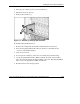
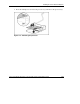
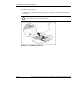
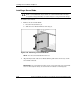
3. Push down on the locking levers on both sides of the processor assembly, and
then rotate them up (1).
4. Remove the heatsink (2).
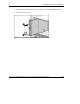
Figure 1-14: Unlatching the processor locking levers
1-20 HP ProLiant BL20p Generation 2 Server Blade Setup and Installation Guide
HP CONFIDENTIAL
Writer: Amy Clute File Name: b-ch1 Installing the Server Blade and Options.doc
Codename: Nipper Part Number: 307158-002 Last Saved On: 9/8/03 2:09 PM