
HP ProLiant BL20p Generation 2 Server Blade Setup and Installation Guide

Installing the Server Blade and Options
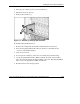
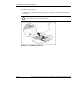
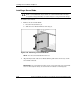
2. Press the port-colored ejector lever release button (1).
3. Pull the ejector lever open (2).
4. Remove the hard drive (3).
Figure 1-13: Removing a hot-plug SCSI hard drive
To install hot-plug SCSI hard drives:
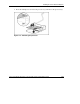
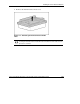
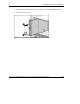
1. Remove the existing hard drive blank or SCSI hard drive from the bay:
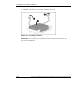
2. Insert the hot-plug SCSI hard drive. Be sure the drive seats firmly into the
connector on the SCSI backplane.
3. Close the ejector lever.
4. If you replaced a hard drive, restore the server blade data from the backup.
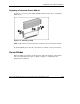
5. Use the hot-plug SCSI hard drive LEDs to identify the status of the installed
drive. For more information about these LEDs, refer to the “Hot-Plug SCSI Hard
Drive” section in Appendix E, “LEDs and Switches.”
6. Resume normal server blade operations.
HP ProLiant BL20p Generation 2 Server Blade Setup and Installation Guide 1-19
HP CONFIDENTIAL
Writer: Amy Clute File Name: b-ch1 Installing the Server Blade and Options.doc
Codename: Nipper Part Number: 307158-002 Last Saved On: 9/8/03 2:09 PM