
HP ProLiant BL20p Generation 2 Server Blade Setup and Installation Guide

Installing the Server Blade and Options
Hot-Plug SCSI Hard Drives and Blanks
Removing Hard Drive Blanks
CAUTION: Always populate drive bays with either a hard drive or blank. Proper
airflow can only be maintained when the bays are populated. Unpopulated drive bays
can lead to improper cooling and thermal damage.
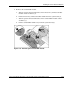
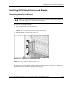
To remove a hard drive blank:
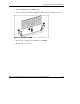
1. Press and hold the release button (1).
NOTE: Port-colored items indicate hot-plug components.
2. Pull the blank out of the drive bay (2).
Figure 1-12: Removing a hard drive blank
NOTE: Store the hard drive blank for future use.
To install a hard drive blank, simply align the blank with the empty bay and slide the
blank into the bay until the locking button engages.
HP ProLiant BL20p Generation 2 Server Blade Setup and Installation Guide 1-17
HP CONFIDENTIAL
Writer: Amy Clute File Name: b-ch1 Installing the Server Blade and Options.doc
Codename: Nipper Part Number: 307158-002 Last Saved On: 9/8/03 2:09 PM