
HP ProLiant BL20p Generation 2 Server Blade Setup and Installation Guide

Installing the Server Blade and Options
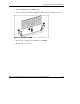
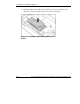
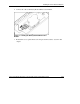
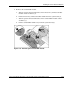
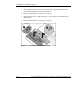
3. Align the FC mezzanine card over the quarter-turn standoff latches where the
standard NIC module was located and install (1).
4. Turn the standoff latches clockwise to secure (2).
5. Align the Smart Array 5i Plus Controller over the quarter-turn standoff latches
and install (3).
6. Turn the standoff latches clockwise to secure (4).
Figure 1-11: Installing the FC mezzanine card
1-16 HP ProLiant BL20p Generation 2 Server Blade Setup and Installation Guide
HP CONFIDENTIAL
Writer: Amy Clute File Name: b-ch1 Installing the Server Blade and Options.doc
Codename: Nipper Part Number: 307158-002 Last Saved On: 9/8/03 2:09 PM